Friday, September 9, 2011

The Blogger app for iOS

Today Google announced the new Blogger app for iOS. With the Blogger app, you can write a new blog post and publish it immediately or save it as a draft right from your iOS device. You can also open a blog post you've been working on from your computer and continue editing it while you're on-the-go. Your blog posts are automatically synced across devices, so you’ll always have access to the latest version.

The Blogger app makes it easy to add photos either by choosing from the gallery or taking a new photo right within the app. You can also add labels and location to provide more details about the post.


Download the Blogger app today for iOS versions 3.2 and above in the App Store. If you’re using an Android-powered device, you can download the Blogger app for Android from the Android Market.

Tuesday, August 9, 2011

Suggestions and autocomplete for Blogger's blog

The text suggestions and autocomplete feature of Google Scribe, now be found in Blogger in Draft.
Google Scribe helps you write more efficiently by suggesting common words and phrases as you type. Google Scribe supports Arabic, Dutch, English, French, German, Hungarian, Italian, Polish, Portuguese, Russian, Spanish and Swedish. The language is automatically detected using the text in the post. Kuntal Loya, Blogger's Software Engineer, said on their blog.
Enabling Google Scribe is easy. Simply click the pencil icon in the toolbar within the Post Editor.


After Google Scribe is turned on, suggestions will appear in gray as you type, and you can accept them by hitting the spacebar or by typing a punctuation mark, such as a comma, period or question mark.


If you would like to receive more than one suggestion at a time, select "Show Multiple Suggestions" from the drop-down menu next to the pencil icon. You will then be able to see several options in a drop-down menu as you type.


Here are some keyboard shortcuts you may find handy. If you use a Mac, you can use the shortcuts below by replacing Ctrl with Command key (or 'Apple' key)

  • Ctrl-j to enable and disable Scribe
  • Ctrl-Shift-j to select and deselect multiple suggestions
  • ESC to temporarily remove a suggestion
  • TAB to restore a suggestion

Happy blogging!

Friday, July 8, 2011

Blogger interface is now available

According to Blogger team. As of right now, the new interface is available for all Blogger in Draft users. There is no sign up or activation process required; Just visit Blogger in Draft, and you’ll find the revamped interface.

Blogger new interface

Inspired by Google’s newest design evolutions, Blogger teamn have updated the look and feel of their new design. Over the last couple of months, we’ve made significant improvements to our new user interface. First and foremost, we’ve incorporated your feedback and made numerous fixes based on that feedback.

As you know, Blogger in Draft is Blogger’s equivalent to “Google Labs”. As Draft users, you'll get to experience Blogger's newest features, including the new design, earlier than other users. If you’re not yet on Blogger in Draft, simply go to draft.blogger.com, and check on the “Make Blogger in Draft my default” option on your dashboard.

Thursday, June 9, 2011

Customize favicon for your Blogger's blog

For many bloggers, having a custom favicon (the tiny image displayed in your browser’s window or tab) is the finishing touch that ties together the design and identity of a great looking blog. Today, Blogger's team announced that Blogger in Draft users can now add a customized favicon to their blog. Many bloggers have waiting this customize for long time.

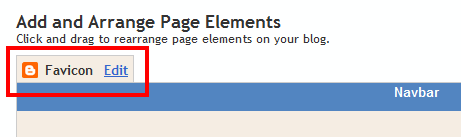
You can add a custom favicon from the Design | Page Elements tab (or, from the Layout tab if you're using the new user interface), by clicking Edit on the new “Favicon” setting above the navbar element:


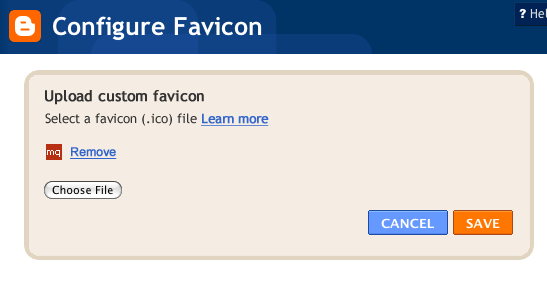
A new window will then open where you can select an image from your hard drive to replace the default favicon image. This initial launch only supports .ico files, but you can easily convert your JPEG, PNG, or other non-ico image file using your own image software. There are also many conversion tools online, and a quick Google Search brings up a handful of options such as http://www.icoconverter.com/.


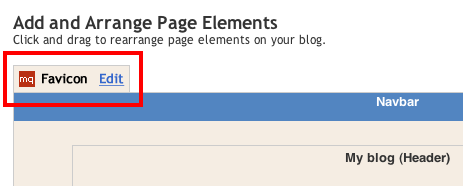
Once you’ve selected the .ico file for your favicon, click Save. Blogger will automatically resize the image to the correct dimensions, and you’ll then see the Page Elements updated with your selected favicon image:


When you save your template changes, you’ll see your newly-added favicon image displayed in your browser window or tab. That’s it!

Thursday, June 2, 2011

Add the +1 Button to Your Blog

“+1” is often used as a digital shorthand for “this is pretty cool.” It’s also a way for friends, contacts, and the rest of the world to find great things on Google search. Google launched the +1 button back in March as a way to help share web content and make search more personal and relevant.

To add the +1 button to your blog, you’ll need to enable Share buttons on Blogger. To do this, go to Design | Page Elements on your Blogger dashboard, find the Blog posts area, click on Edit, and select the “Show Share Buttons” option. If you are already using Share buttons, the +1 button will automatically show up as a new share option.


By adding the +1 button to your blog, you’re providing an easy way for your visitors to recommend your posts to their friends right from your blog.

[via]

Friday, May 13, 2011

Blogger was down for more than 36 hours


If you’re one of the many people that uses Blogger, you may have noticed some issues with your blog lately – namely, that you can’t update it. Blogger users have been locked out of their blogs since Wednesday night when a behind-the-scenes maintenance update went wrong.

Users were informed on Monday that there would be an outage on Wednesday at 10 p.m. PST for an hour-long maintenance update. However, at 11 p.m., Blogger wasn’t back up. Blogger users were unable to update their blogs, and haven’t been able to for about 36 hours. Site content has been put into read-only mode, which means visitors can still come to the blog and read posts, but bloggers just can’t add any new material.

As if that wasn’t bad enough, any posts that were added after 7:37 a.m. PST on Wednesday have been removed. Google updated its Blogger Status blog at 6:07 a.m. PST Friday saying it has started restoring the posts that were temporarily removed.

Updated on Blogger Buzz, Eddie Kessler, Tech Lead/Manager, Blogger said that Blogger is back now.
"What a frustrating day. We’re very sorry that you’ve been unable to publish to Blogger for the past 20.5 hours. We’re nearly back to normal — you can publish again, and in the coming hours posts and comments that were temporarily removed should be restored. Thank you for your patience while we fix this situation. We use Blogger for our own blogs, so we’ve also felt your pain."

Thursday, May 5, 2011

Refreshed interface for image and video upload

Clicking the “photo” or “video” upload buttons in Insert image will now display a sleeker, updated picker. Blogger's also made it draggable so you can look back at the post editor if you need to. [via]

Thursday, April 7, 2011

Best Paid Blogging Websites

Today, blogging activity can be an alternative way to get money or as second profession. A big number of bloggers create and manage their blog to earn revenue from the internet services. Those services are like: pay per click program, Google AdSense, online reviews, and paid to blog.


Those programs are legal by law. Beside you earn money, you can understand how the online business today. The most profitable in giving us revenue and knowledge is paid blogging.

Paid Blogging asks you to write a review about someone’s sites. You can give the positive words or the negative one. However, the reason of advertiser asking you to write about them is to show the world about their service and to build a good links.

To start a paid blogging program, you don’t have to prepare your money for registration, because they are FREE. All you need to prepare is your own quality.

PayPerPost.com
These folks pioneered the “get paid to blog” concept. Besides being the most popular paid blogging network, I’ve found that they always seem to have the most job opportunities available at any given time. PayPerPost pays bloggers anywhere from $5 to over $200 per completed and approved post.

Bloggerwave.com
Although Bloggerwave is a smaller paid blogging network and lists fewer open job opportunties, their site is super blogger-friendly and easy to to navigate. Bloggers here get paid a minimum of $10 for each completed and approved post. Bloggerwave also pays on time and like clock-work.

Smorty.com
You’ll like Smorty because they pay from $6 to $100 for each post and they pay-out weekly. A great feature with Smorty is that bloggers are allowed to have multiple blogs so income earning potential is unlimited. The Pagerank of your blog along with a high Smorty smart score determines how much you can earn – up to $100 per post.

ReviewMe.com
Bloggers – get paid to review products and services on your site. You control what you review. You will be paid $20.00 to $200.00 for each completed review that you post on your site.

LoudLaunch.com
With LoudLaunch the amount you are paid per post is based on your blog ranking? LoudLaunch allows bloggers to be compensated for distributing our advertisers LoudLaunch press releases. Search through our advertisers latest press release campaigns, select campaigns aligned with your blog, post a Micro Press Release on your blog based on the advertisers campaign, and be compensated based on the exposure your blog can deliver.

BloggingAds.com
BloggingAds is different. They supply the advertisers, the text and the money, all you have to do is post the ad on your blog. We are looking for bloggers to post one-time ads on their blog sites for money.

SponsoredReviews.com
A Sponsored Review is an article you write for an advertiser. You review their products and services and then post the review on your blog. Each advertiser has his or her own requirements. Bloggers can earn anything from $10 to $500+ for each review.

BlogsVertise.com
Once approved, your blog goes into the assignment queue. The blogsvertise administrator then assigns writing tasks for what our advertisers want you to mention in your blog. The current payout rate for new accounts is $4 – $25 per entry.

PayU2Blog.com
If your blog meets our requirements then you can make money blogging in our system and you can count on Payu2blog to deliver that consistent steady income from advertising on your blog.

CreamAid.com
CREAMaid is a service that lets you meet other bloggers with similar interests, and make money while doing it. Anyone can start using CREAMaid by inserting a CREAMaid Conversation widget inside her post. When your post is selected, you will be able to instantly collect a royalty for your contribution (usually about $5).

Contextual.v7n.com
Do you own a blog? Blog publishers in the Contextual Links @ V7N Network make cash and get paid by PayPal for simply adding text links to their blog posts. Currently publishers make $10 per link.

LinkWorth.com
LinkWorth is a search engine marketing company that offers a variety of monetization options for bloggers. LinkWorth gives up to 70% of the revenue for its ads.

InBlogAds.com
If you have a blog, you can make money simply by reviewing other websites. You receive 60% of the sale price for each review.

DewittsMedia.com
Your blog must have a minimum Page Rank of 3 to be accepted. You get paid a flat fee of $10.00 per post.

LinkyLoveArmy.com
Your rate of pay to blog for this company is based on your Google’s PageRank (from $5 to $16 per post).

PayMeToBlogAboutYou.com
The process is simple! Register, look for bloggers or advertisers, negotiate back and forth via the messaging system, strike a deal, BUZZ and compensate!

BlogChex.com
Migrate your existing blog or start a new one . Refer a friend and get 5% of what the friends blog site makes. Promote your blog and get paid.

Monday, April 4, 2011

Chrome Extension for Dynamic Views

Last week Blogger brought five exciting new ways to view your blog content, which take advantage of the latest web technologies to provide a richer experience for your readers. You can already see these views in action by appending /view to the end of any Blogger URL, and now Blogger announced another way to experience these views via the Blogger Dynamic Views Chrome extension.


Once installed, the extension will automatically detect when you are viewing a Blogger blog, and then display a Blogger icon (the orange ‘B’!) in your address bar which lets you select and view the blog in one of the five new dynamic views.


Of course, you can always disable the extension whenever you want from the Extensions section of the Tools menu.

[via Blogger Buzz]

Saturday, April 2, 2011

Free Blogspot Templates: Simplebox Template

Preview: http://simpleboxtemplate.blogspot.com

  • From your Blogger dashboard, go to Design | Edit HTML
  • Make sure to back up your old template before install this new one by click on the "Download full template"
  • Check on the "Expand Widget Templates"
  • Now copy/paste this code to replace all the code in the HTML code section
  • Click Save Template button and you're done.